
If a compatible live feed exists
Calee can connect to it, with changes continuing to be made in the system that owns the event.
Calee for Sports Clubs
Your club stays in control of its calendars. Families follow the club, team, age-group, grade, squad or program calendars relevant to them in the Calee mobile app, alongside school, work and family life.
Calee for Sports Clubs is a sporting-club solution built on Calee Business.
Australian ownedLocal Australian support
Foundation Club offer
A$249 + GSTper club/year
Start with what you already have
Send us what you already have — a fixture or calendar link, an association draw, PDF, spreadsheet or even a photo of the schedule. We’ll review it and tell you the best way to start.
Calee can connect to it, with changes continuing to be made in the system that owns the event.
For a Foundation Club, Calee can use that existing information to prepare the initial club and team calendars for your club to review.
We can agree the club and team calendar structure first, ready for the dates when they become available.
We reply within 1–2 business days.
Foundation Club onboarding
One club contact. Calee handles the initial setup.
For Foundation Clubs, send us the fixture source, calendar files or season information your club already has. Calee sets up the initial club and team calendars and prepares them for your club to review before families are invited.
Calee creates the initial club-wide, team, age-group, grade, squad, division or program calendars agreed with your club, using the current season information your club already has.
Where a compatible live feed exists, we connect it. Where the club’s dates are provided as existing season information such as a draw, file or spreadsheet, Calee prepares the initial dates for review.
Calee prepares the relevant follow links and QR material, plus ready-to-use wording your club can use in registration email and social channels.
Calee is built and supported in Australia, so the people setting your club up and the people you deal with afterwards are an Australian team.
One authorised club contact confirms the calendar structure, names and initial dates before families are invited.
If a compatible live feed is connected, changes remain in the source system.
If there is no compatible live feed, an authorised club person maintains those dates in Calee after launch.
Same-day cancellations, wet-weather decisions and urgent changes stay on the club’s existing direct channels. Calee is not an emergency alert system.
For the club
Club-wide dates, individual teams, age groups, grades, squads, divisions and programs can each have their own calendar. Your club decides which of them exist and who maintains each one.
The intent is a consistent structure the club can hand on — registrar to registrar, coach to coach, team manager to team manager, season to season — instead of rebuilding the arrangement each year. Whether that changes how your club runs is what a first season with Calee is meant to show.
Club structure
A club is rarely one audience. Calee lets a club keep a club-wide calendar for everyone, plus separate calendars for the teams, age groups, grades, squads, divisions or programs that need their own dates.
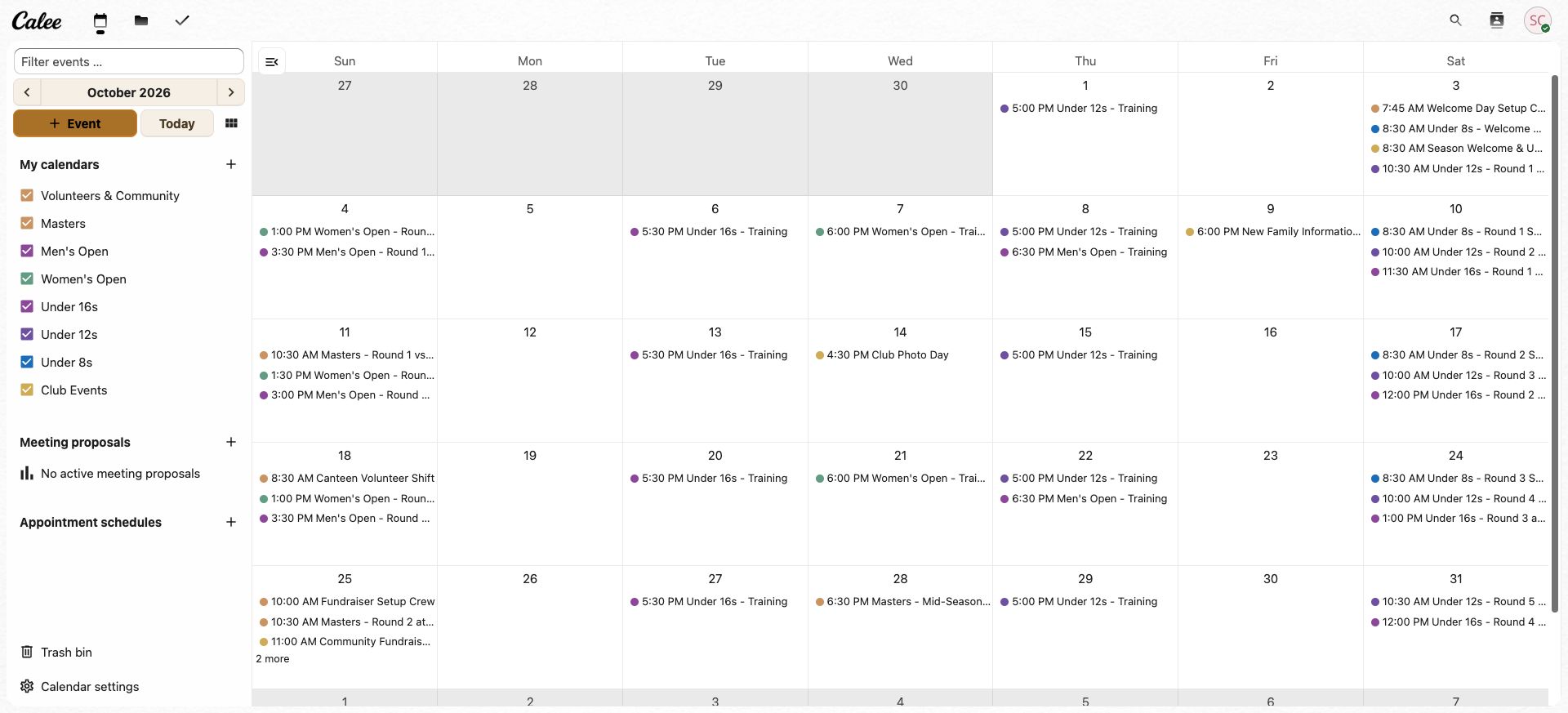
Dates that matter to everyone connected to the club.
Dates that only that team, age group, grade, squad, division or program needs.
A club can run one calendar, a handful, or one per team. The structure is agreed with your club before anything is set up.
What families see
Families follow the calendars that matter to them — not every fixture across the club.
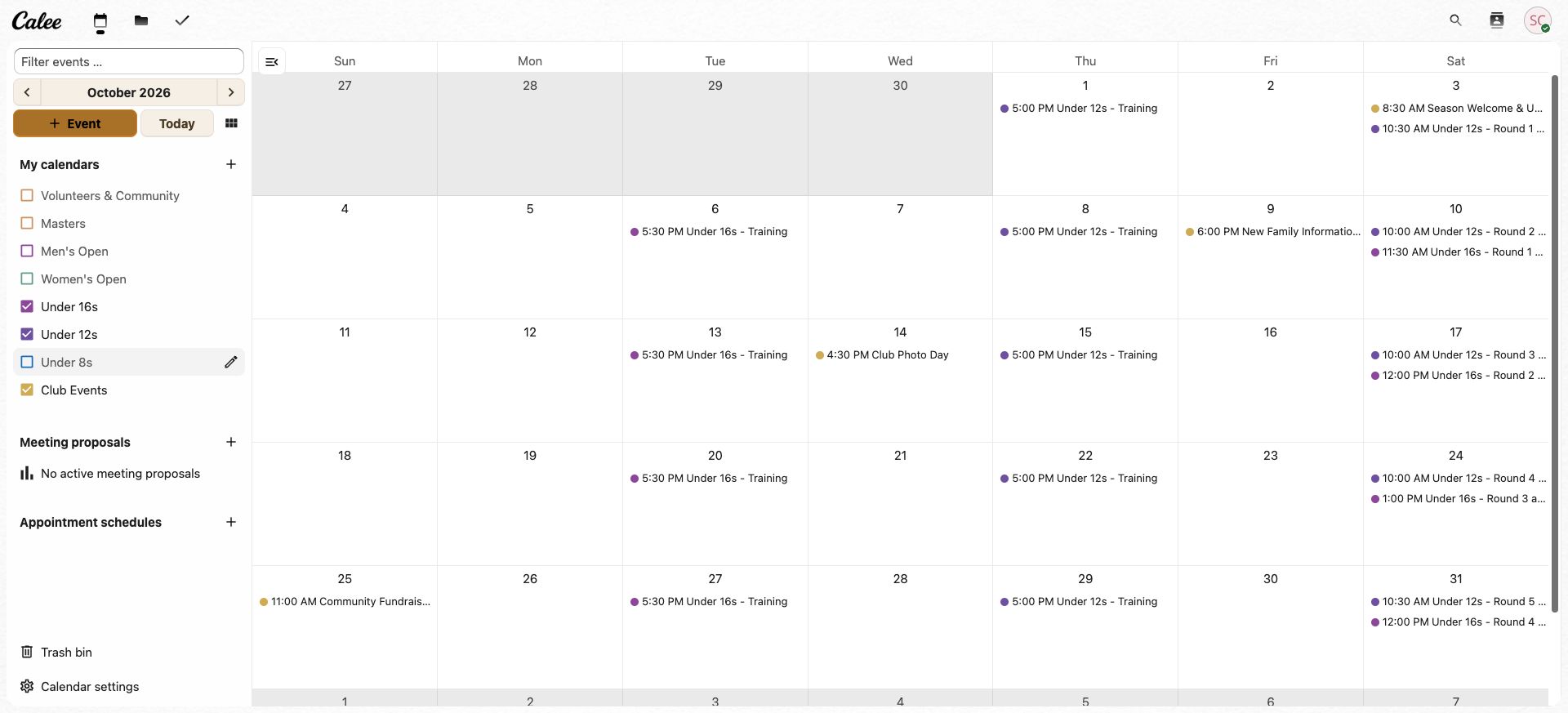
Two players, two teams, plus everything the club publishes for everyone.
Those calendars still exist for the families and volunteers they belong to.
This is one demonstration household, not a product rule. Every family chooses the combination that applies to it, and can change that at any time.
Public club calendars can be followed in Guest mode in the Calee mobile app, free and without creating a Calee account, up to five calendars per phone. Opening a calendar the phone already follows does not use another slot, and removing one frees a slot again.
See it working
One maintained club event, three views, no family re-entry.
The club publishes
The club, or an authorised team administrator, maintains the date, time, location and useful details on the relevant team calendar.
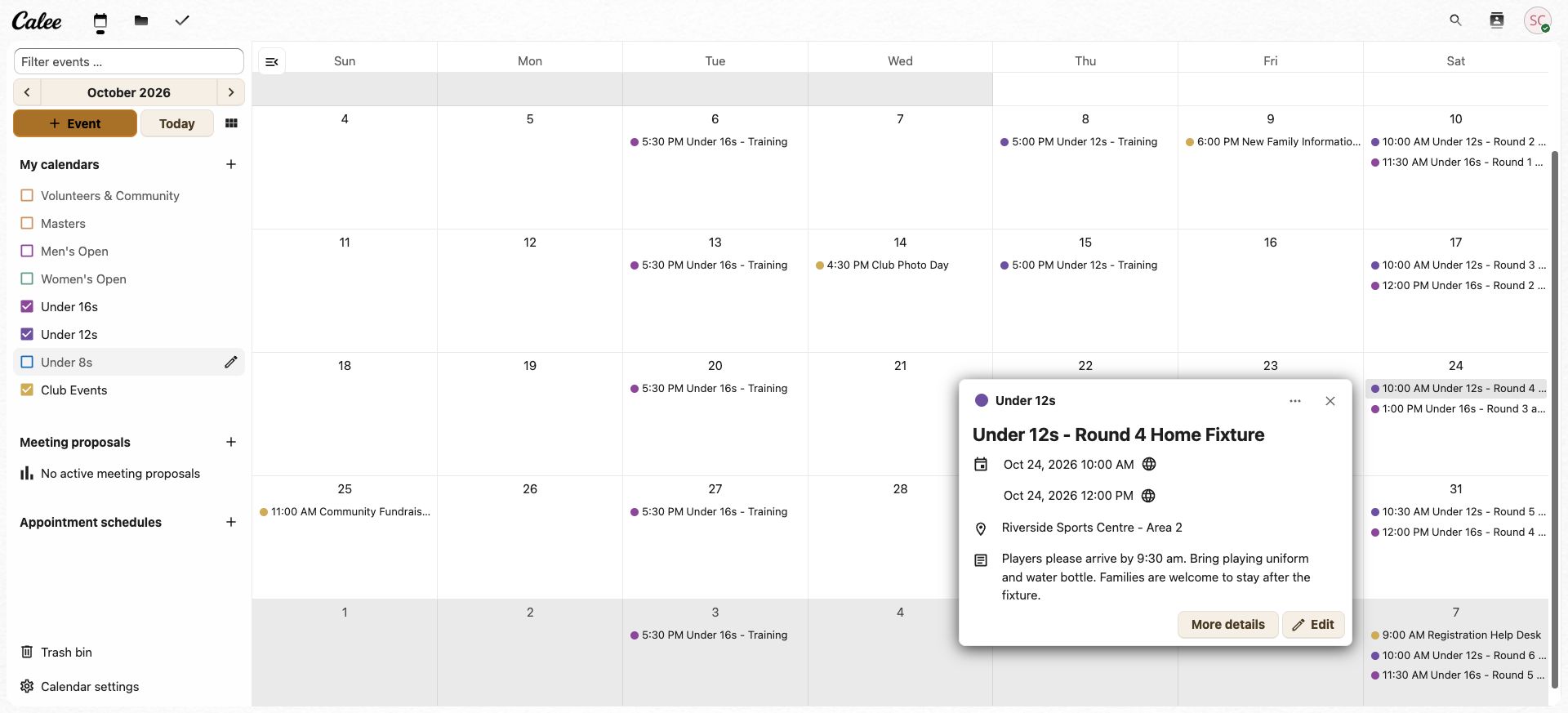
The family sees it on their phone
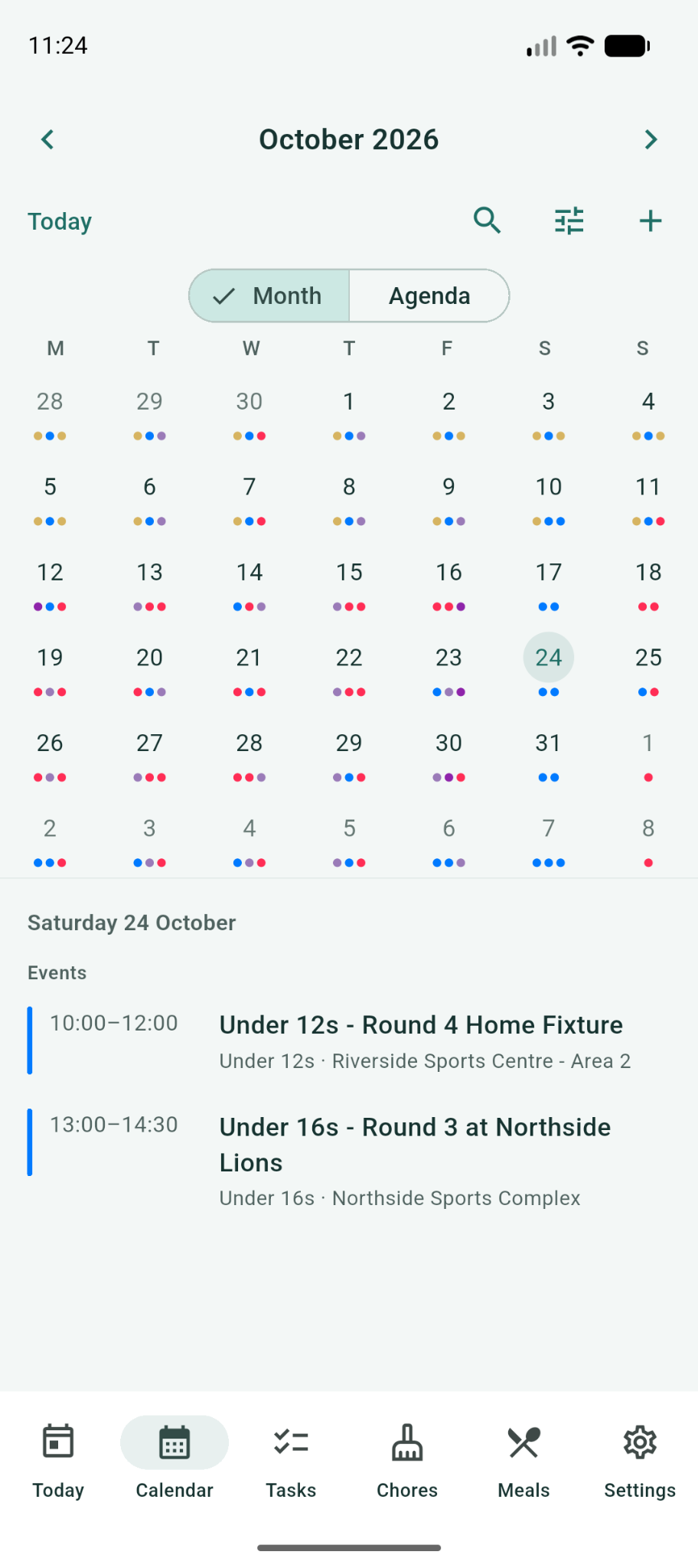
The fixture arrives in the Calee mobile app inside the household’s own calendar, not in a separate club app. Families following that calendar do not need to copy the event into Calee themselves.
This household has a player in two teams, so Saturday 24 October already carries both: the Under 12s round 4 home fixture from 10:00 to 12:00, and the Under 16s round 3 away game from 13:00 to 14:30 at another venue. Two children, two teams, one morning to plan.
The plan stays accessible at home
Training and fixtures sit beside school, work, appointments and everything else the household is already juggling — so the week is planned as one week, not against a fixture list on its own.
Families keep club dates alongside the rest of family life in the Calee mobile app. A household that wants a permanently visible shared view can optionally add a Calee Display — nothing above depends on one.
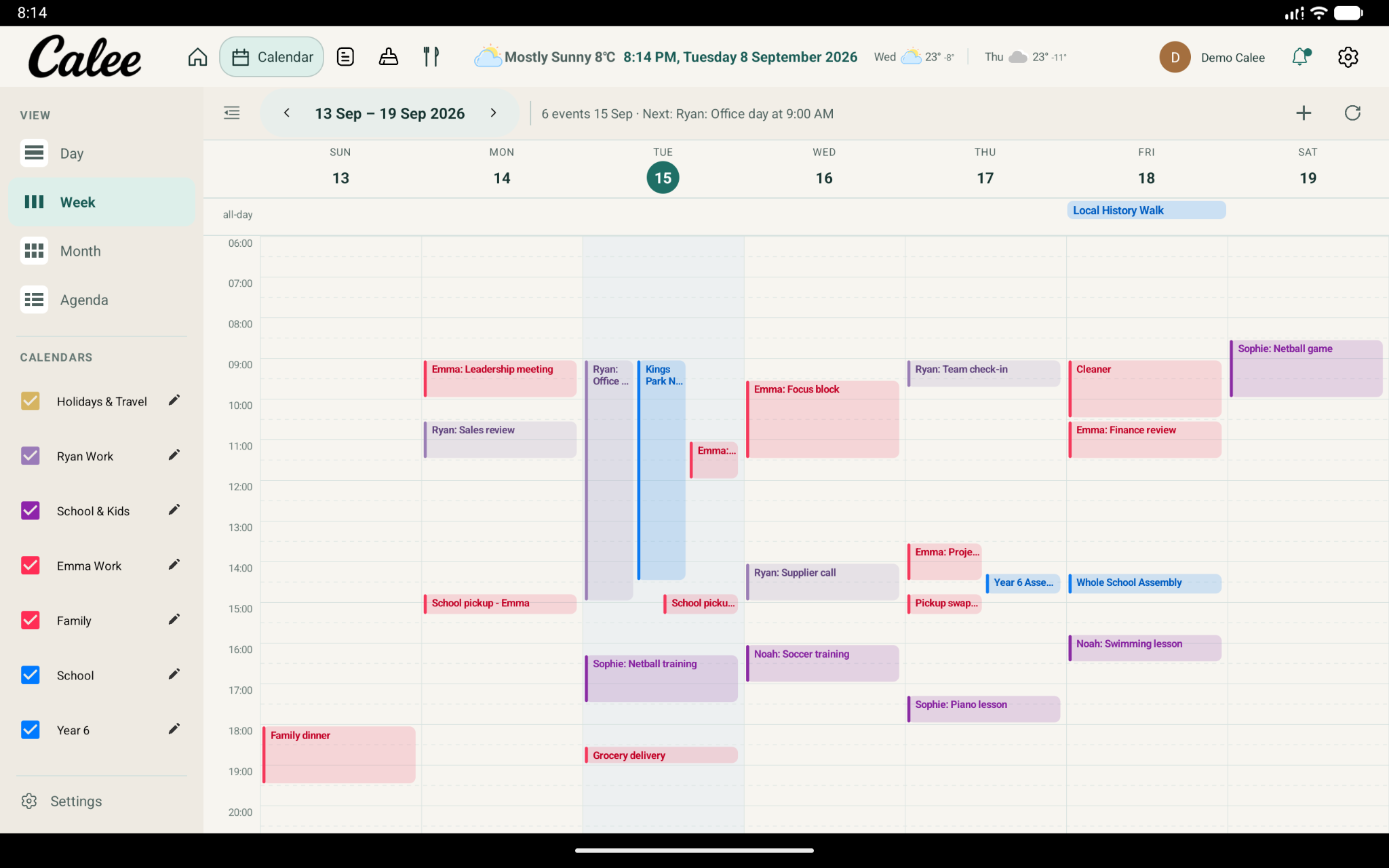
When the club updates the calendar, families see the latest published information in Calee. Timing depends on the calendar or source workflow, so keep using your club’s normal direct channel for urgent cancellations, venue changes and other same-day news.
Why this matters
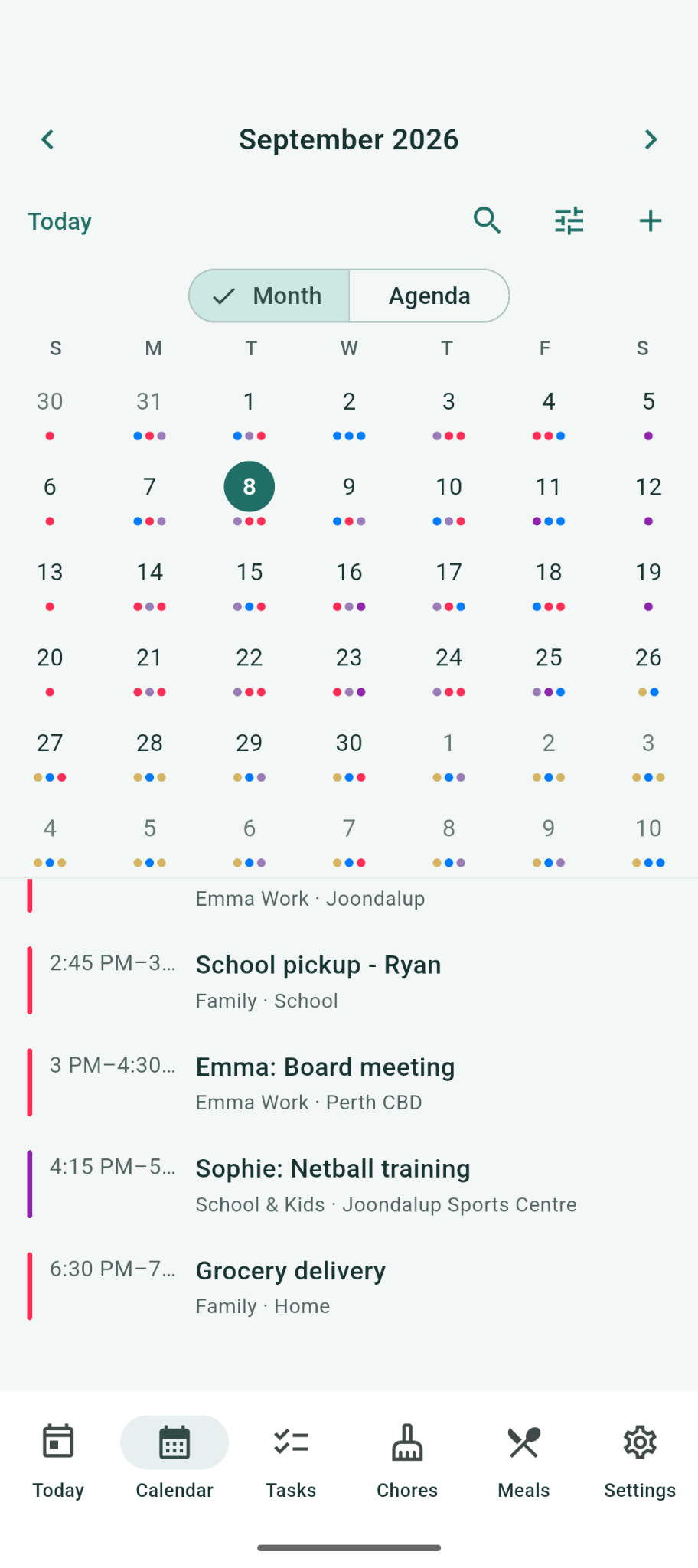
Knowing the fixture is only part of the planning. Families need to see sport alongside school, work, appointments and everything else happening that week.
When club dates sit in the same view as school, work and family plans, a clash is visible in advance instead of on the morning.
The club stays in control of its dates at every stage.
Entered or connected once, in the calendar the dates belong to.
Separated by team or group, not one long club-wide list.
Those dates appear in the Calee mobile app beside everyday life.
On phones, with an optional shared Calee Display.
Adoption
Calee does not need to replace them.
Keep using your competition or registration system for the jobs it already does — registrations, competition administration, results and ladders.
Keep using email, WhatsApp, Messenger, Facebook, SMS and whatever else your club already runs on for conversations and urgent messages. Calee gives families a calendar view of the club dates that apply to them alongside the rest of family life.
If an existing system provides a compatible live calendar feed, Calee can connect to it. If it does not, the relevant club or team dates can be maintained in Calee instead.
Importing a calendar file copies the events into Calee; it does not create a live connection to the original source.
Connected external calendars are read-only in Calee, so changes are made in the system that owns the event.
Calee does not claim automatic fixture synchronisation with any competition or registration system.
For the mechanics of creating, importing, sharing and subscribing to calendars, see the Calee Calendar Guide and the subscriber guide.
For club administrators
None of this changes the story above. It is what a registrar, secretary or team manager will want confirmed before they say yes.
Club-wide dates are usually maintained centrally, and a team calendar can be looked after by the coach or team manager closest to it, according to the permissions that apply to that calendar.
The club chooses which calendars to share and whether to use account-specific access or a published read-only link, supported by onboarding instructions or a QR code.
A published link can be forwarded, so use account-specific access where tighter control is needed.
Options can include:
Connected external calendars are read-only in Calee where applicable, so changes are made in the system that owns the event.
Where event attachments are enabled, authorised club users can add a supporting file to an event — a score sheet photo, a results PDF, a ladder update, a team sheet or a match report — from the camera, the photo library or a file picker.
Calee does not read the scores in a document, calculate a competition ladder or publish the file to a public club webpage. Public website presentation can be scoped separately.
Attachments are available only on supported, writable Calee-managed calendars, and depend on the calendar type, account permissions and enabled product configuration.
Short, clear names work best. A team calendar’s name does not need to repeat the club name, and its identity does not have to be tied to one season.
If the club keeps the same underlying team calendar, it can update the visible name when the age group or division changes. If a replacement calendar is created instead, families need to follow the new one.
Renaming alone may not preserve every connection across every external system, so season changes are worth planning deliberately.
We’re inviting the first 10 sporting clubs to help shape Calee for Sports Clubs.
Foundation Club offer
A$249 + GST per club/year
One club. One annual licence. No per-family charges.
The Foundation Club rate applies to the first 10 sporting clubs that enter a Foundation Club agreement.
Start with one team, age group or program if that is the simplest way to introduce Calee. The Foundation Club licence is for the club; rollout does not have to happen everywhere at once.
A club-wide calendar plus the teams, age groups or programs your club wants to start with.
Your committee, registrar or team managers check the calendars before families are invited.
Publish the follow links to the families they apply to, then bring in more teams or groups when your club is ready.
Calee Business is licensed to the club. Families following published club calendars are not billed to the club as organisation users.
Public calendars can be followed in Guest mode in the Calee mobile app, free and without creating an account, up to five calendars per phone.
A Calee Display is a separate household product and is not required to follow a club calendar.
Foundation setup includes the agreed initial club and team calendars and preparation of the agreed current-season dates from the information your club already has. Historical migration, custom integration or work beyond the agreed Foundation setup is scoped and costed separately before proceeding.
Foundation Clubs keep their Foundation pricing while continuously subscribed, subject to annual CPI indexation under the Foundation Club agreement.
Taking this to a committee meeting? Ask us for the one-page summary.
Calee is built and supported in Australia by My Calee Pty Ltd, ABN 25 674 810 916.
A published link can be forwarded, so use account-specific access where tighter control is needed.

Who you are dealing with
Calee started with a problem in our own household: too many calendars, too many group chats, and one person carrying the whole plan.
For clubs considering Calee, our Australian team can work through your existing calendar setup and the scope of a first season with you.
Club enquiries: info@calee.com.au
Talk to us about your clubPolicies & support
Tell us about your club and we will show you how your club and team calendars could be organised in Calee, what families would see, and how the Foundation Club offer would apply to your club. Or email info@calee.com.au.
No. Calee is not a competition system, a registration platform, a club website or a results and ladders product. Those keep doing their jobs. Calee brings the club calendars relevant to a household into the Calee mobile app alongside school, work and family life.
Yes. A club can keep a club-wide calendar plus separate calendars for teams, age groups, grades, squads, divisions or programs. The structure is agreed with your club before anything is set up.
No. A family follows the club-wide calendar and the team or group calendars relevant to their household, and can change that at any time. The other calendars stay with the families and volunteers they belong to.
Only where the source provides a compatible live calendar feed. Where it does not, the relevant dates are maintained in Calee instead. Importing a calendar file copies the events across but does not create a live connection to the original source, and Calee does not claim automatic fixture synchronisation with any competition or registration system.
Send it to us and we will tell you the best way to start. For a Foundation Club, Calee can use that existing season information to prepare the initial club and team calendars for your club to review. That is people reading what your club sends, not automatic extraction from a file, and it does not create a live connection to wherever the file came from. After launch, an authorised club person maintains those dates in Calee unless a compatible live feed is connected.
After the initial setup, your club owns the ongoing calendar maintenance. Club-wide dates are usually maintained centrally, and a team calendar can be looked after by the coach, registrar or team manager closest to it, according to the permissions that apply to that calendar. Where a compatible live feed is connected, the system that owns those events stays the place they are changed.
Not to follow a public club calendar. Public calendars shared through a follow link can be added in Guest mode in the Calee mobile app, free and without creating a Calee account, up to five calendars per phone. Opening a calendar the phone already follows does not use another slot, and removing one frees a slot again.
No. The Calee Display is a separate household product and is not required to follow a club calendar. Following club and team calendars, seeing them beside school, work and family commitments, and getting updated event details all happen in the Calee mobile app on its own. A Display adds a permanently visible shared view at home for households that want one.
No. Calee Business is licensed to the club as an annual organisation licence, and families following published club calendars are not billed to the club as organisation users. The Foundation Club offer is A$249 + GST per club/year, available to the first 10 sporting clubs that enter a Foundation Club agreement.
Keep them on the channel your club already uses. Same-day cancellations, wet-weather decisions and other urgent changes should go out through your club’s existing direct communication channels. Calee is not an emergency alert system.
Update it where that calendar is maintained — in Calee, or in the system that owns the event where a compatible live feed is connected. Families following the calendar then see the latest published information without re-entering it themselves. Timing depends on the calendar or source workflow.
Yes. Start with a club-wide calendar and one team, age group or program if that is the simplest way to introduce Calee, then extend when your club is ready. The Foundation Club licence is for the club, so starting small does not change what the licence covers.
Yes, if the source provides a compatible live calendar feed. Where it does not, the relevant club or team dates can be maintained in Calee instead. Importing a calendar file copies the events across but does not create a live connection to the original source. Compatibility depends on what your club already has, so the approach is confirmed with you during setup.
Calee is built and supported in Australia by My Calee Pty Ltd. For a Foundation Club, Calee sets up the initial club and team calendars from the season information the club already has and prepares the family launch kit, and one club contact reviews the setup before families are invited. Local Australian support is available afterwards at support@calee.com.au.